
whoami - Terminal Résumé
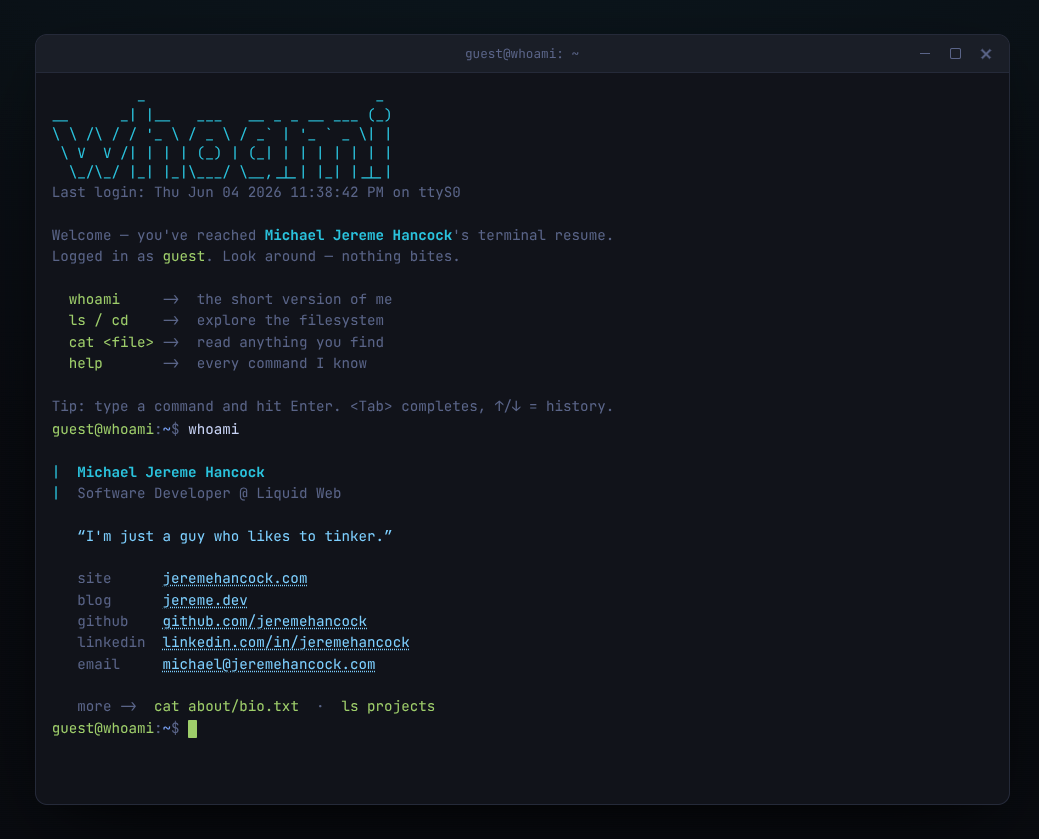
A Résumé That Boots Like a Terminal
Every developer eventually hits the same wall with the personal site. You want something that says "I write code" without saying it in a generic hero section with a gradient and three feature cards. You could build the usual portfolio. Or you could make the thing itself the demo.
whoami goes with the second option. It's a résumé that pretends to be a Linux terminal. It boots with an ASCII MOTD, drops you at a real prompt, and lets visitors poke around using the commands they already know — ls, cd, cat, man, and, of course, a slightly cheeky whoami. Instead of reading your bio, people explore it.
And it's built the way these things should be built: pure HTML, CSS, and vanilla JavaScript. No framework, no build step, no dependencies. Just files you open in a browser or drop on any static host.
It actually behaves like a shell
The easy version of this idea is a fake terminal that recognizes five hard-coded commands and prints canned strings. This isn't that. It commits to the bit.
There's a virtual filesystem you genuinely walk through — ls, cd, pwd, and tree all work, and so do the path conventions your fingers already know: relative paths, .., ~, and /. cat reads any file in it. Every built-in command has a real man page and a whatis entry, so the help system isn't decoration, it's discoverable the same way a real shell's is.
The ergonomics are where it earns trust. Tab completes both commands and paths. The ↑/↓ arrows scroll through history. And the muscle-memory control codes are wired up — Ctrl+L to clear, Ctrl+C, Ctrl+U, Ctrl+A, Ctrl+E. If you've spent any time in a terminal, the surprising thing is how little surprises you. It just does what you'd expect, which is the highest compliment you can pay an interface like this.
The whole site is one JSON file
Here's the part that makes it more than a novelty: all of the content lives in a single content.json file. Your profile, your prompt name, and — crucially — the entire filesystem are described in one place. Edit it, reload, done. No build step stands between you and your changes.
The filesystem is the clever bit. The tree object in the JSON is the directory structure. A nested object is a directory; a string or array of strings is a file. So adding a new section to your "résumé" is as simple as adding a key, and ls, cd, cat, tree, and tab-completion all pick it up automatically. You're not registering files anywhere or updating a manifest — you're just describing a shape, and the shell figures out the rest.
Files can be written three ways depending on how much you're saying: a single inline string for a one-liner, an array of strings when you want explicit line breaks, or a pointer to a real .md/.txt file on disk for the long stuff. That last option means you can keep short blurbs inline and write your actual experience as proper Markdown files under content/, version-controlled and edited in whatever you normally use.
Five themes and a pile of Easter eggs
It looks the part, too. There's window chrome, a blinking block cursor, colored output, and scanlines on the retro themes. Five palettes ship with it — default, matrix, amber, dracula, and a light mode — and you switch with theme amber. Your choice is remembered between visits, which is a small touch that makes it feel finished rather than demoed.
And then there are the jokes, because a project like this lives or dies on them. There's a healthy stash of Easter eggs tucked away — a few familiar commands that do more than they should, and at least one directory that doesn't show up unless you go looking. I'll leave the rest for you to find. They're the reward for the kind of visitor who'll actually type around — which, if you're using this as a résumé, is exactly the kind of visitor you want to delight.
Serving it (and one gotcha)
Because the content lives in content.json, the browser has to fetch it, and browsers only allow that over HTTP. So you serve it — python3 -m http.server 8000 locally, or just upload the folder to any real web host, where it works without thinking about it. Double-clicking index.html straight off your disk technically opens, but file:// URLs can't fetch the JSON, so you get a small built-in fallback instead of your content. Worth knowing up front, since it's the one place the "just open the file" simplicity has an asterisk.
The flip side is that deployment is genuinely nothing. It's static files. Static host, Nginx, an object store, a container — pick whatever you already have. Paths resolve correctly whether it's served from a site root or a subdirectory, so you can park it at you.com/whoami/ and it behaves.
Who this is for
If your personal site is a placeholder you've been meaning to fix, or you want a résumé that's memorable to the specific audience of people who hire developers, this is a fun answer. It's small enough to read end to end, has no toolchain to maintain, and the content lives in one file you fully control. You can fork it, audit it, and host it anywhere in about the time it takes to read this post.
It's also just a nice example of restraint — no frameworks, no dependencies, no build. The terminal does the talking.
AI Disclosure
This project was created with the help of AI.
Links
- GitHub: jeremehancock/whoami-web
- My whoami : whoami.jereme.dev